
What Is an Industrial PC and What Is It Used For?
An Industrial Pc is built for places where ordinary office computers can struggle: a packaging line, a dusty workshop, or a control cabinet beside vibrating machinery. It runs familiar software, yet its components and enclosure are selected for demanding operating conditions. Some models use fanless cooling, sealed cases, and wide-temperature components. Others provide serial ports, multiple Ethernet connections, or expansion slots for specialized equipment. Small details matter. A loose connector can interrupt a production shift.
Industrial computing specialist Hans Beckhoff, founder of Beckhoff Automation, is closely associated with PC-based control. Rather than present an unverified quotation as his exact words, this guide uses an editorial summary of that approach: “Computing power belongs close to the machine, where control and data meet.” That idea helps explain why industrial PCs appear in factory automation, machine vision, energy systems, transportation, and remote monitoring. They can collect sensor readings, run control applications, display operator screens, and send production data to other systems.
The right computer depends on the job. A dusty food-processing area may need a sealed fanless unit; a vision station may need stronger processing and camera connections. No single specification guarantees reliability. Installation, maintenance, software compatibility, and backup plans matter too. A useful choice starts with the actual environment—not a feature list alone.
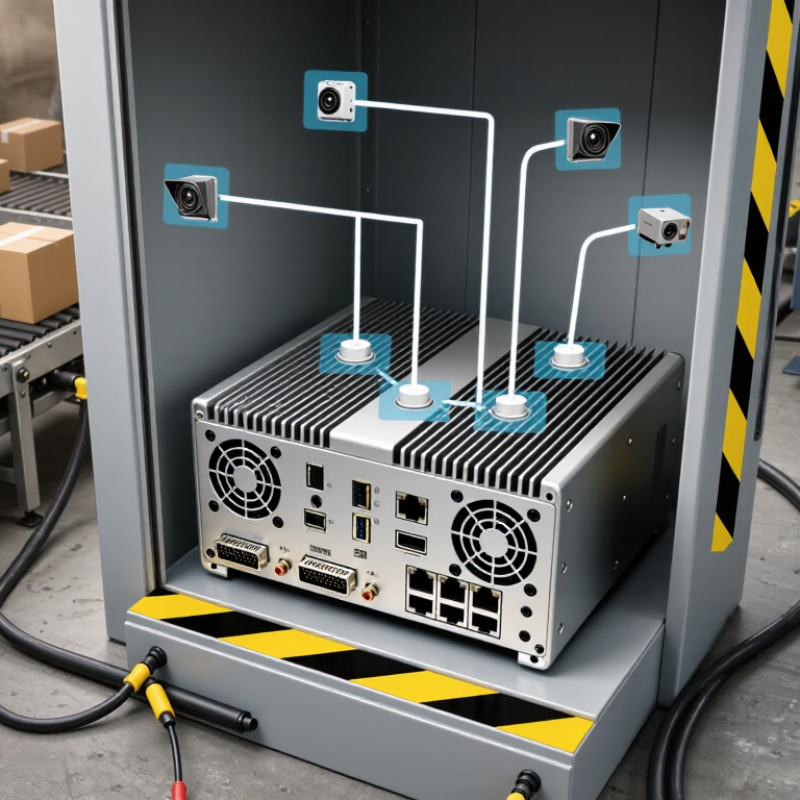
Table of Contents [Hide]
What Defines an Industrial PC?
An industrial PC is defined less by its appearance than by how reliably it works in a demanding setting. A metal case helps, but it proves little on its own. The system should be specified for conditions such as heat, dust, vibration, and continuous operation. Check the actual operating-temperature range and vibration ratings, rather than relying on words like “rugged.” Ratings describe tested limits, not a guarantee that every installation will be trouble-free.
Its design also reflects the equipment it must connect to. A factory-floor computer may need serial ports, digital I/O, or reliable Ethernet alongside familiar USB connections. Fanless cooling can reduce moving parts, though it may limit performance or require careful heat management. That trade-off matters. Mounting options, accessible storage, and replaceable components can also affect how quickly technicians restore a system.
Long service life is another defining feature. Industrial PCs are often selected for stable configurations and predictable parts availability, since changing hardware can require retesting software and connected machinery. Yet “industrial” does not mean maintenance-free. Dust still gathers, cables loosen, and operating conditions can exceed a specification. I would treat the term as a starting point, then compare the published ratings with the actual environment and workload.
Core Components and Design Features
An industrial PC combines a processor, memory, storage, and input/output ports in a computer built for demanding environments. The processor handles machine-vision feeds, control logic, or production dashboards; memory keeps active tasks responsive. Solid-state storage tolerates vibration better than many moving-disk designs, though it still needs protection from heat and electrical noise. Ports matter. A cabinet may need serial connections, Ethernet, digital inputs, and isolated outputs to communicate with older equipment. One overlooked detail: a powerful processor can become a liability if the enclosure traps heat.
Design choices shape uptime. Metal enclosures, secured connectors, wide-range power inputs, and fanless cooling can reduce exposure to dust, vibration, and accidental cable pulls. Yet fanless is not magic; clogged vents or poor cabinet airflow can still raise temperatures. IDC’s Worldwide Edge Spending Guide forecast global edge-computing spending of $232 billion in 2024, up 15.4 percent from 2023. That market estimate signals growing investment near data sources, but it does not measure industrial-PC reliability. For buyers, the useful evidence is component temperature ratings, vibration test results, ingress-protection ratings, and documented support lifetimes. Check the actual test conditions. Numbers without context can mislead. A machine beside a warm press needs a different thermal design than a clean control room.
How an Industrial PC Operates
An industrial PC operates by receiving signals, processing data, and sending commands to connected equipment. Sensors may report temperature, vibration, or production speed through wired input and output connections. Inside the computer, the processor runs control software that checks these readings against set values. It can then adjust a motor, trigger an alert, or record the data for later review. The cycle repeats continuously, often in a cabinet near machinery.
Unlike a typical office computer, an industrial PC is built to handle demanding conditions. A sealed enclosure can help limit dust, while a fanless design reduces moving parts that may wear out. Depending on the model, it may also tolerate a wider range of temperatures or electrical interference. Still, the computer is only one part of the system. Poorly secured cables, incorrect settings, or a weak network connection can interrupt operation. Real installations are not always as tidy as diagrams suggest.
Tips: Check the operating temperature and power requirements before installation. Keep cables labeled, and test alarm responses during commissioning. Leave room for airflow where the design requires it. One overlooked detail can cause downtime.
Common Industrial PC Applications
Industrial PCs support the everyday work of factories, utilities, warehouses, and transport systems. On a production line, they can collect sensor readings, display machine status, and coordinate tasks such as packaging or inspection. The scale is substantial: the International Federation of Robotics reported about 4.28 million industrial robots operating worldwide in 2023. These robots depend on reliable control and monitoring systems, though an industrial PC is only one part of the wider setup.
In energy facilities, industrial PCs can present temperatures, pressure readings, and equipment alarms on a single screen. The International Energy Agency estimated that industry accounted for around 37% of global energy use in 2022, making accurate monitoring valuable for identifying waste. In warehouses, these computers can connect scanners, conveyor controls, and inventory systems. At a loading bay, an operator might use one to spot a stalled belt before parcels pile up.
Conditions matter. Dust, vibration, heat, and interrupted network connections can affect performance, so enclosure design and maintenance deserve attention. A dashboard can also show incomplete or delayed data. That part is easy to overlook. Industrial PCs help people make decisions; they do not guarantee that every reading is correct. Sources: International Federation of Robotics, World Robotics 2024; International Energy Agency, industry energy data.
What Is an Industrial PC and What Is It Used For? — Common Industrial PC Applications
| Application | Typical Tasks | Common Operating Conditions | Useful Industrial PC Capabilities | Typical Connections |
|---|---|---|---|---|
| Factory automation | Run human-machine interfaces, monitor production lines, collect machine status, and coordinate control software. | Continuous operation near machinery, with electrical noise and possible vibration. | Reliable 24/7 operation, multiple display outputs, wide-temperature options, and support for industrial software. | Ethernet, serial ports, USB, and digital I/O. |
| Machine vision and inspection | Acquire images, inspect product dimensions or defects, and send inspection results to production systems. | High data throughput; installation may be close to cameras, conveyors, or production equipment. | Fast processors, suitable camera interfaces, storage for image data, and expansion for specialized acquisition hardware. | Gigabit Ethernet, USB, camera interfaces, and PCIe expansion where required. |
| Process monitoring and control | Display process values, log sensor readings, issue alarms, and provide an operator interface. | May operate in control rooms or near equipment exposed to dust, heat, or vibration. | Stable long-term operation, connectivity for field devices, and support for monitoring or supervisory control applications. | Ethernet, serial communications, and analog or digital I/O through compatible modules. |
| Transportation systems | Support passenger information, onboard monitoring, dispatch interfaces, or equipment diagnostics. | Potential exposure to shock, vibration, temperature changes, and limited installation space. | Rugged construction, secure mounting, suitable power input, and a temperature range matched to the installation. | Ethernet, serial ports, GNSS or wireless modules, and vehicle-specific interfaces as needed. |
| Energy and utilities | Collect equipment data, present operating status, support remote monitoring, and assist with local control. | Remote sites may have temperature variation, dust, electrical interference, or limited maintenance access. | Extended operating-temperature options, dependable storage, remote-management support, and flexible communications. | Ethernet, serial ports, cellular or other network modules, and I/O interfaces. |
| Warehouse and logistics automation | Coordinate conveyor systems, display work instructions, track equipment status, and connect to scanners or terminals. | Frequent equipment movement, busy wireless environments, and long daily operating hours. | Compact or panel-mount designs, responsive performance, wireless connectivity options, and straightforward service access. | Ethernet, Wi-Fi, USB, serial ports, and scanner or sensor interfaces. |
| Digital signage and kiosks | Display operational information, provide self-service interfaces, or run local media and application software. | Public or semi-public locations, sometimes with restricted ventilation or continuous operation. | Multiple display support, compact installation, remote maintenance options, and storage suited to the application. | HDMI or DisplayPort, Ethernet, USB, and optional wireless networking. |
| Building management | Visualize building systems, collect equipment data, manage alarms, and provide a local monitoring station. | Typically installed in control rooms or equipment areas with limited space and extended operating hours. | Low-maintenance operation, support for monitoring software, and interfaces for building-system networks. | Ethernet, serial ports, and compatible fieldbus or I/O modules. |
How to Choose an Industrial PC for a Task
Choosing an industrial PC starts with the task, not the processor. Write down what it must control, measure, or display, and how quickly it must respond. A system reading a few temperature sensors has different needs from one analyzing camera feeds. Be specific. Estimate software, memory, storage, and network demands using real workloads where possible. Oversizing can waste budget, while too little capacity may cause delays during peak operation.
Next, describe the installation site. Note ambient temperature, dust, moisture, vibration, available space, and power quality. A cabinet beside a motor, for example, may need stronger vibration tolerance and secure connectors. A fanless enclosure can reduce dust intake, but it may run hotter under sustained loads. Check operating limits and mounting clearances, then test the PC inside the actual enclosure. Specifications are not the whole story.
Match connections to existing equipment: Ethernet, serial ports, USB, display outputs, or expansion slots. Confirm voltage, connector type, and whether interfaces can operate simultaneously. Choose storage and memory with room for expected software updates, but avoid paying for unused capacity. Consider maintenance, too: Can staff replace a drive or clean the cabinet without interrupting production? I would allow a modest capacity margin, then review it after a pilot. Early estimates are often wrong.